Your Next Action Is Two Dots Away
Summary
What’s new for command completion in IntelliJ IDEA Modern IDEs are packed with power. The real challenge isn’t whether your IDE can do something – it’s remembering how to trigger it. Some features live behind shortcuts. Others are available through intention menus, Search Everywhere, postfix completion, live templates, or tool windows. Discoverability is a constant […]
Original Text
What’s new for command completion in IntelliJ IDEA
Modern IDEs are packed with power. The real challenge isn’t whether your IDE can do something – it’s remembering how to trigger it.
Some features live behind shortcuts. Others are available through intention menus, Search Everywhere, postfix completion, live templates, or tool windows. Discoverability is a constant tax on developer focus: As an IDE grows more capable, keeping every feature within reach gets harder.
That’s why we created command completion, a context-aware entry point to useful functionality from the place where you spend most of your time – the editor.
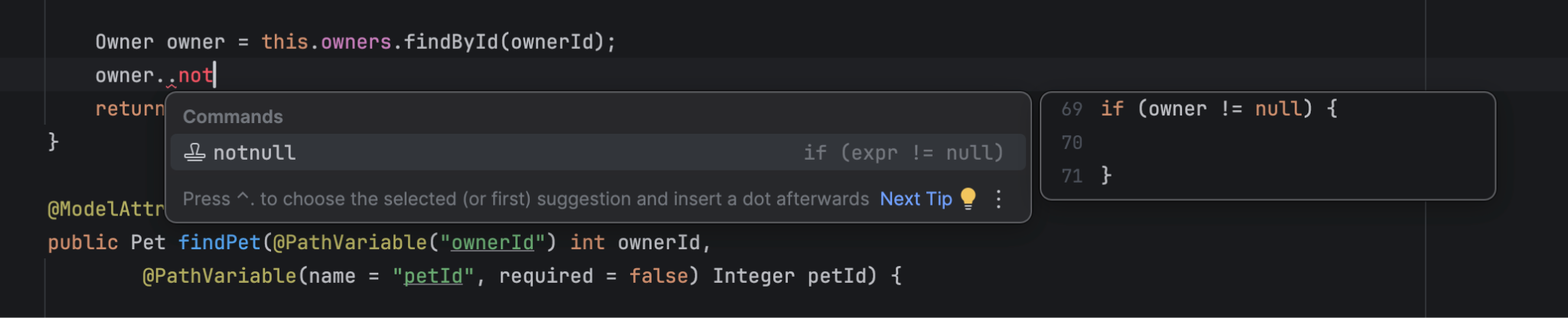
Typing .. anywhere in a file surfaces intelligent actions tailored to your current code and caret position. Whether you need to refactor, navigate, generate, document, explain, or fix code, you can act immediately without breaking your flow.
Rather than answering “What can I type here?”, command completion addresses a more useful question: “What can I do here?”
This feature has already been around for a while. In IntelliJ IDEA 2026.3 EAP, it is taking another big step toward becoming your primary interface for everyday coding assistance.
Here’s what’s new and improved:
Logpoints are easier to reach
Debugging with temporary println() statements is a habit many of us struggle to break. You add print statements, re-run the app, read the console, and then manually clean up the code afterward.
Logpoints are a cleaner, non-intrusive alternative – and now they are accessible right through command completion:
Simply type .. over an expression or block to drop a logpoint instantly, using the current expression or context as the logged value. Even better: IntelliJ IDEA will now suggest replacing existing print statements with logpoints, helping you move from messy code edits to clean, debugger-supported logging.
If you’re new to logpoints, take a look at the logpoints tutorial. It explains how to combine them with your AI agents in IntelliJ IDEA. If you missed our 2026.2 updates, logpoints got a revised UI, AI agent support, improved navigation, and faster evaluation, making them one of the most versatile debugging tools in your toolkit.
In-context AI assistance
You can now trigger AI actions using the same .. workflow. Need to explain a complex method, generate docstrings, or refactor a block? You no longer have to interrupt your flow, switch tools, or describe the exact location to the agent. Because the IDE already knows your active file, language, line number, and selected expression, it can give the agent this rich context.
Note: If you have the Air plugin installed, your requests will be automatically routed through it.
For actions that affect a specific class, method, or declaration, IntelliJ IDEA now highlights the target so it is clearer what the selected command will apply to before you run it.
Postfix completion and live templates
As part of our effort to unify completion workflows, postfix completion, live templates, and command completion now share a consistent interface. You’ll notice clearer filtering, sharper preview panels, and more intuitive discoverability directly from the completion popup.
More contexts
Command completion is also becoming useful in more contexts, including binary files and decompiled code.
We’ve also expanded support to structured and framework-specific environments. You can now use .. inside properties files, Spring workflows, and other domain-specific formats, with support for build scripts coming soon.
Why this matters
Command completion isn’t just another flavor of autocompletion. It is a fundamental shift in how you discover IDE functionality.
Instead of searching through top-level menus or memorizing hotkeys, you can start from where you already are – the code. IntelliJ IDEA continuously analyzes your syntax tree, scope, inspection state, and available actions to present only what is relevant in the moment.
For high-frequency actions, shortcuts remain the fastest choice. For everything else, command completion gives you a discoverable path directly from your code.
Try it out today
Open any Java, Kotlin, or Scala file in IntelliJ IDEA 2026.2 or 2026.3 EAP and type .. anywhere in the editor. Try it near a method, an expression, a regular expression, a declaration that needs documentation, or a place where you would normally open Search Everywhere. The completion popup will reflect what’s possible in that exact spot.
Command completion is continuously evolving, and we have big plans for future releases. Our core mission remains simple: one familiar entry point for whatever you want to do next in code.
Lotu Radar provides attributed news summaries and links to the original publisher. Full reporting and copyright remain with the source.