What’s New in PyCharm 2026.3
Summary
At the center of this release is JetBrains Air – a new layer for agentic development. It lets you run, track, and verify multi-agent workflows directly inside your IDE, with code intelligence keeping agents on track and complete review tools in your hands. This release also brings workspaces that adapt terminals and consoles to individual […]
Original Text
At the center of this release is JetBrains Air – a new layer for agentic development. It lets you run, track, and verify multi-agent workflows directly inside your IDE, with code intelligence keeping agents on track and complete review tools in your hands. This release also brings workspaces that adapt terminals and consoles to individual subprojects, initial support for Python 3.15 lazy imports, interactive FastAPI dependency graphs, and deeper Pydantic inspections, and so much more.
Download PyCharm 2026.3 now
Check out an overview video by our developer advocate William Vincent:
Now, let’s take a closer look at the key highlights.
JetBrains Air in PyCharm – One place to run your agents and verify their work
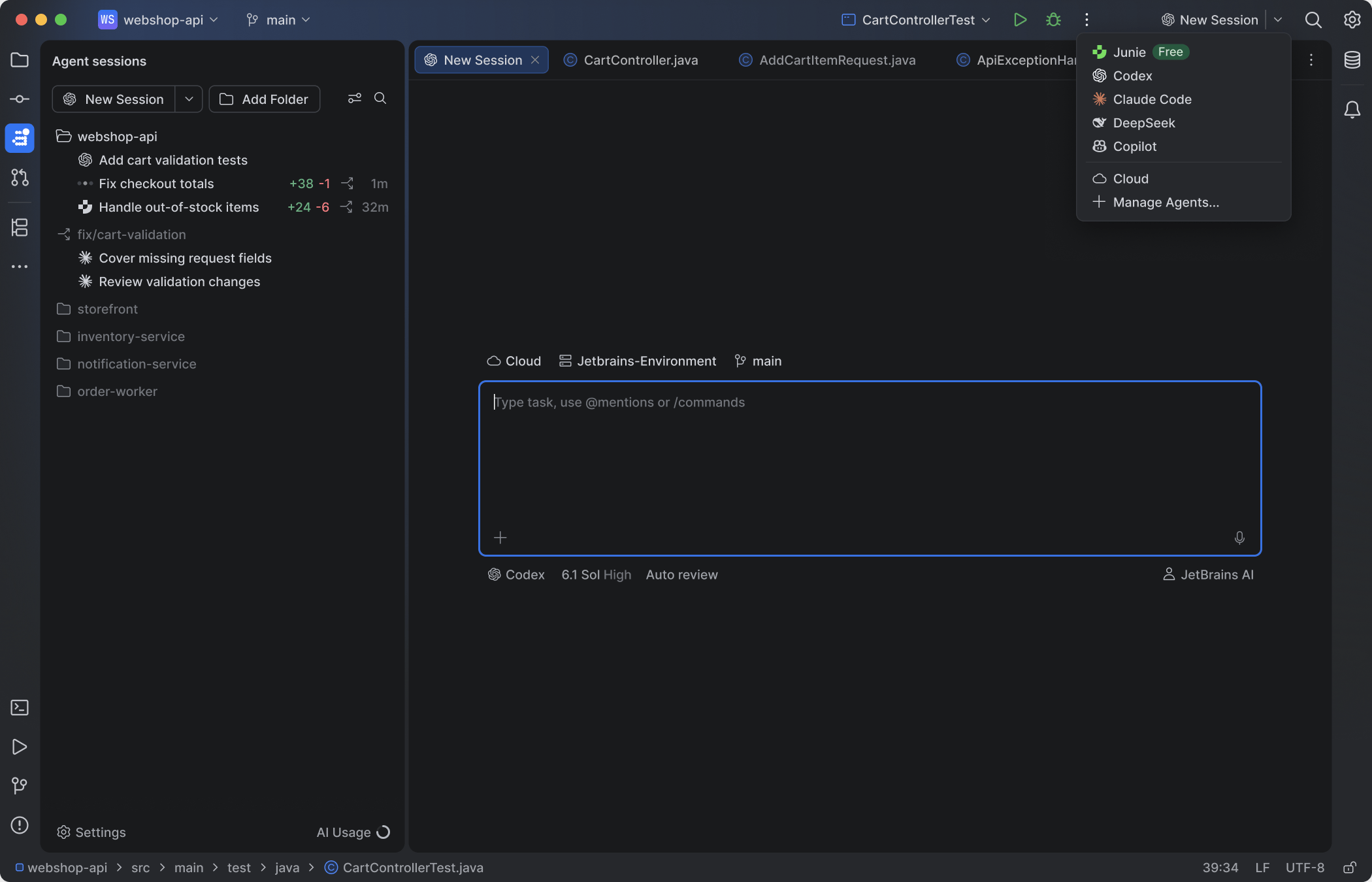
As of this release, JetBrains IDEs ship with Air, a new layer for agentic development. Work with the coding agents of your choice, and run, track, and verify multi-agent workflows inside your IDE, where code intelligence helps agents make fewer wrong turns and gives you the tools to review every change before it ships.
Your agents, your models, your subscriptions – with Junie Lite for free
Air works with Claude Agent, Codex, Gemini, GitHub Copilot, Junie, OpenCode, and other ACP-compatible agents. It detects the agents already installed on your machine so you can connect them in a click, and you can add more from the agent registry.
Your existing setup carries over, too: provider subscriptions, API keys, and even a custom base URL all work, with no JetBrains AI subscription required. Run Claude Agent on your Claude subscription in the terminal or in a full-screen IDE tab, use other agent subscriptions in the chat or terminal, and switch between subscriptions at any moment, even mid-session.
Air includes free AI with the Junie Lite configuration, so you can use an agent without a subscription. You only need a JetBrains Account.
A central workspace to review changes and guide the agent
Review an agent’s changes with the surrounding code and your project tools in view, and send feedback straight back to the agent. Anchor a note to a specific line in the diff, or comment directly from the code, so the agent gets concrete context about the change you want. Work in the chat or the terminal, whichever suits you.
Still using AI Assistant? A notification will offer you a trial of Air. Moving to Air hides AI Assistant, if you wish to return to AI Assistant follow the steps outlined here. Air automatically migrates your IDE skills, MCP configuration, agents installed through ACP, authentication, and chat history. Chat mode history isn’t migrated.
Workspace support
A console and terminal for each subproject
Each subproject has its own Python console and terminal running in its own environment, so you run code against the dependencies that subproject actually uses. In uv workspaces, the console uses the workspace environment and adds the subproject root to sys.path.
Right-click a subproject and select Open in | Python console to start a console for it.
Open a terminal while a subproject file is in the editor to run commands in that subproject’s environment.
Subproject creation and conversion
You can add a new subproject or convert an existing folder from the Project tool window context menu. The subproject is initialized using uv, Hatch, or Poetry, and automatically added as a workspace member to your root pyproject.toml in uv workspaces.
Python 3.15 lazy imports
PyCharm now supports the lazy import syntax introduced in Python 3.15. A lazy import defers loading a module until it’s first used, which can noticeably cut startup time in applications and scripts with heavy dependencies. PyCharm parses and resolves lazy imports like regular ones, so you can adopt the syntax without giving up code insight on the names you import.
Learn more about lazy imports in our blog post.
FastAPI support [Pro]
An endpoint can depend on a chain of Depends() and Security() calls spread across many files. PyCharm draws that chain as a graph for any endpoint. Each dependency is marked as yield or return, and circular dependencies, which raise a RuntimeError at startup, are flagged in the editor. In the other direction, a dependency shows which endpoints rely on it, directly or through other dependencies.
You can open the graph from the gutter icon next to an endpoint or click the endpoint count above a dependency to see its usages.
Python interpreter widget
The redesigned Python interpreter widget in the status bar is built around the tools that manage your environments, such as uv, Poetry, Hatch, and conda. It detects the ones installed on your machine and lists the environments each one manages for your project.
Environments created from the command line also appear under their tool. To start working in one, open the widget, select the tool, and pick the environment. To recreate it with a different Python version, choose Recreate Environment under Current Environment. If the Python version you choose isn’t installed, you’ll be prompted to download it.
Pydantic support
PyCharm now provides deeper editor support for Pydantic models. Field constraints, validators, and configuration are read from the model’s declaration and used across the editor.
Values passed to a model are checked against its Field() constraints, such as min_length, max_length, gt, and lt, with a warning displayed when one is broken.
A field name inside @field_validator('price') now resolves to that field’s definition, letting you jump straight to it.
Code completion suggests configuration options in a model’s class arguments, such as validate_by_name and validate_by_alias.
What you see here only scratches the surface of what is included in PyCharm 2026.3. From editing standalone files in the new Home window to full SQLAlchemy ORM support, automatic project configuration copy in Git worktrees, and remote development directly from the IDE via SSH – there is plenty more to explore across code insight, testing, environments, and version control.
Head over to the What’s new in PyCharm 2026.3 page to see the complete list of features, performance improvements, and fixes.
Read the full What’s New
We would love to hear how JetBrains Air and the new workspace tooling fit into your day-to-day work – share your thoughts in the comments below or submit feedback directly in our issue tracker.
Lotu Radar provides attributed news summaries and links to the original publisher. Full reporting and copyright remain with the source.